
Storage & usage
NevTan Mail shows your storage use so you know when you're getting close to your limit.
The storage meter
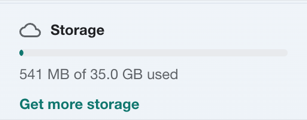
The sidebar meter shows the storage your mail and Drive files use together, out of your total. You're warned at 85%, 90% and 95%; when it's full you can't send new attachments, but incoming mail still arrives. (Accounts without a storage quota, such as super admins, don't see the meter.)
Getting more storage
Storage is part of your plan — each mailbox is allotted the amount of storage set for your subscription. Mail and Drive share this space. Admins can buy extra storage for a mailbox from Admin → Subscription → Storage by choosing Increase storage on its row (a Get more storage shortcut links there); it is added on top of the plan's size (1 GB + 30 GB = 31 GB) and renews monthly. Only the workspace admin pays. See Plans & pricing for how storage and billing work together.
Still need a hand?
Our support team usually replies within one business day.
Email us at info@nevtan.com